
Download iAsk – Advanced AI Search Engine, Free Trial, Secure Answers
Overview
iAsk.AI is a subscription‑based web application that positions itself as an AI life assistant capable of answering natural‑language questions with a level of precision that rivals traditional search engines. Created by Diana Tiart, the platform leverages cutting‑edge Natural Language Processing (NLP) and a large‑scale Transformer model to deliver instant, factual, and unbiased responses. Unlike many AI chatbots that rely on vague internet snippets, iAsk.AI pulls data from vetted academic books, reputable wikis, and focused forums, ensuring that each answer is rooted in reliable sources. The service does not store user queries, which adds a layer of privacy and security for individuals concerned about data retention. While the tool excels at delivering concise, citation‑free answers, it currently lacks a dedicated mobile app, multilingual capabilities, voice search, and features such as query history or result filtering. Nevertheless, for professionals, students, and curious minds who need quick, accurate information without the noise of ads or irrelevant links, iAsk.AI provides a compelling, subscription‑based solution.
Key Features of iAsk.AI
- Natural‑language understanding powered by a state‑of‑the‑art Transformer model.
- Instant, factual answers drawn from academic books, specialized wikis, and curated forums.
- Privacy‑first architecture: no query storage or personal data retention.
- Consistent, unbiased responses thanks to training on reliable, vetted sources.
- Web‑based interface accessible from any modern browser on Windows, macOS, Linux, Android, or iOS.
- Subscription model includes regular updates and improvements to the underlying AI model.
- Secure HTTPS connection ensuring encrypted communication between user and server.
These features collectively make iAsk.AI a powerful tool for anyone who regularly conducts research, needs quick fact‑checking, or simply enjoys exploring topics through conversation‑style queries. The platform’s emphasis on source reliability reduces the risk of misinformation, a common pitfall in many free AI chat services. Moreover, because iAsk.AI operates entirely in the browser, there is no need for bulky installations or constant patching—updates are applied server‑side, guaranteeing that every user benefits from the latest improvements without manual effort. While the lack of a mobile app may deter users who prefer native experiences, the responsive web design ensures a smooth experience on tablets and smartphones alike.
Installation, Usage & Compatibility
Getting Started – No Download Required
iAsk.AI is a cloud‑based service, which means you do not need to download or install any software on your device. To begin, simply visit the official website, create an account, and choose a subscription plan that fits your needs. A free trial is often available, allowing you to test the AI’s capabilities before committing.
Step‑by‑Step Setup
- Open your browser: Use the latest version of Chrome, Firefox, Edge, or Safari for optimal performance.
- Navigate to iAsk.AI: Enter the URL (https://iask.ai) and click “Sign Up”.
- Create an account: Provide a valid email address and a strong password. Verify your email if prompted.
- Select a plan: Choose between monthly or annual subscriptions; a free trial may be offered.
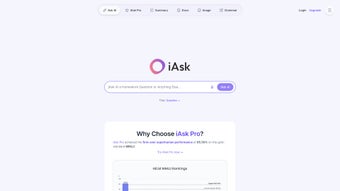
- Start asking: Once logged in, you’ll see a clean input box. Type any natural‑language question and press “Enter”.
Using iAsk.AI Effectively
The interface is intentionally minimalist. To obtain the best results, phrase your query as clearly as possible. For example, instead of “weather”, ask “What is the average temperature in Paris in April?” The AI will parse the request, locate the most relevant information from its curated sources, and return a concise answer. Since iAsk.AI does not store queries, you cannot retrieve past questions; however, you can copy answers to a personal notes app if you need to keep a record.
System Compatibility
iAsk.AI works on any device that supports a modern web browser, including Windows 10/11, macOS Monterey or later, most Linux distributions, Android 9+ and iOS 13+. Because the service is web‑based, there are no specific hardware requirements beyond an internet connection and a browser that supports JavaScript and TLS 1.2 or higher.
Pros & Cons – A Balanced Review
Pros
- Highly accurate answers thanks to a large, well‑trained Transformer model.
- Privacy‑centric design with no storage of user queries.
- Access to vetted academic and reference sources reduces misinformation.
- Responsive web interface works across all major operating systems.
- Regular updates included in the subscription keep the AI current.
Cons
- No dedicated mobile app; relies on browser experience.
- Lacks multilingual support, limiting usefulness for non‑English speakers.
- No query history or personalization options.
- Cannot filter or sort results; answers are presented as single statements.
- No source links or citations, which can be a drawback for academic work.
- Direct developer support is not available; users rely on community forums.
Overall, iAsk.AI offers a compelling blend of speed, accuracy, and privacy that makes it stand out in the crowded AI assistant market. While the absence of a mobile app and multilingual capabilities are noticeable gaps, the core functionality—delivering precise, source‑based answers—justifies the subscription cost for professionals and students alike.
Frequently Asked Questions
Is iAsk.AI really free to try?
iAsk.AI typically offers a limited‑time free trial that lets new users explore the platform’s capabilities before subscribing. The exact duration varies, so check the website for the current offer.
Can I use iAsk.AI on my smartphone?
Yes. Although there is no native mobile app, the web interface is fully responsive and works in modern browsers on Android and iOS devices.
Does iAsk.AI store my search history?
No. iAsk.AI is designed with privacy in mind and does not retain any user queries after the session ends.
What types of sources does iAsk.AI draw from?
The AI is trained on a curated set of academic books, reputable wikis, and specialized forums, ensuring that the information it provides is factual and unbiased.
How can I contact support if I encounter an issue?
Direct developer support is not offered; users typically rely on community forums or the help center available on the iAsk.AI website.
Conclusion – Should You Download iAsk.AI?
If you value instant, accurate answers backed by reputable sources and are comfortable working within a browser, iGive iAsk.AI a strong recommendation. Its privacy‑first approach, cross‑platform compatibility, and subscription‑included updates make it a solid investment for students, researchers, and knowledge‑hungry professionals. While the lack of a mobile app and multilingual features may be deal‑breakers for some, the core experience—quick, reliable, and unbiased information—delivers real value. Ready to experience a smarter way to search? Start your free trial today and see how iAsk.AI can streamline your research workflow.



.png)



